
Percuity Product Walkthrough: How Leo Runs Continuous Optimization
The fastest way to understand Percuity is to watch it work. This walkthrough follows Leo through one full optimization loop — reading the accounts, answering a reporting question, sizing up competitors, making new creative, building the campaign, and queuing up what to do next. It runs about a minute and forty seconds.
Below is what happens in each chapter, in case you want to jump to the part you care about.
0:06 — Access every campaign touchpoint
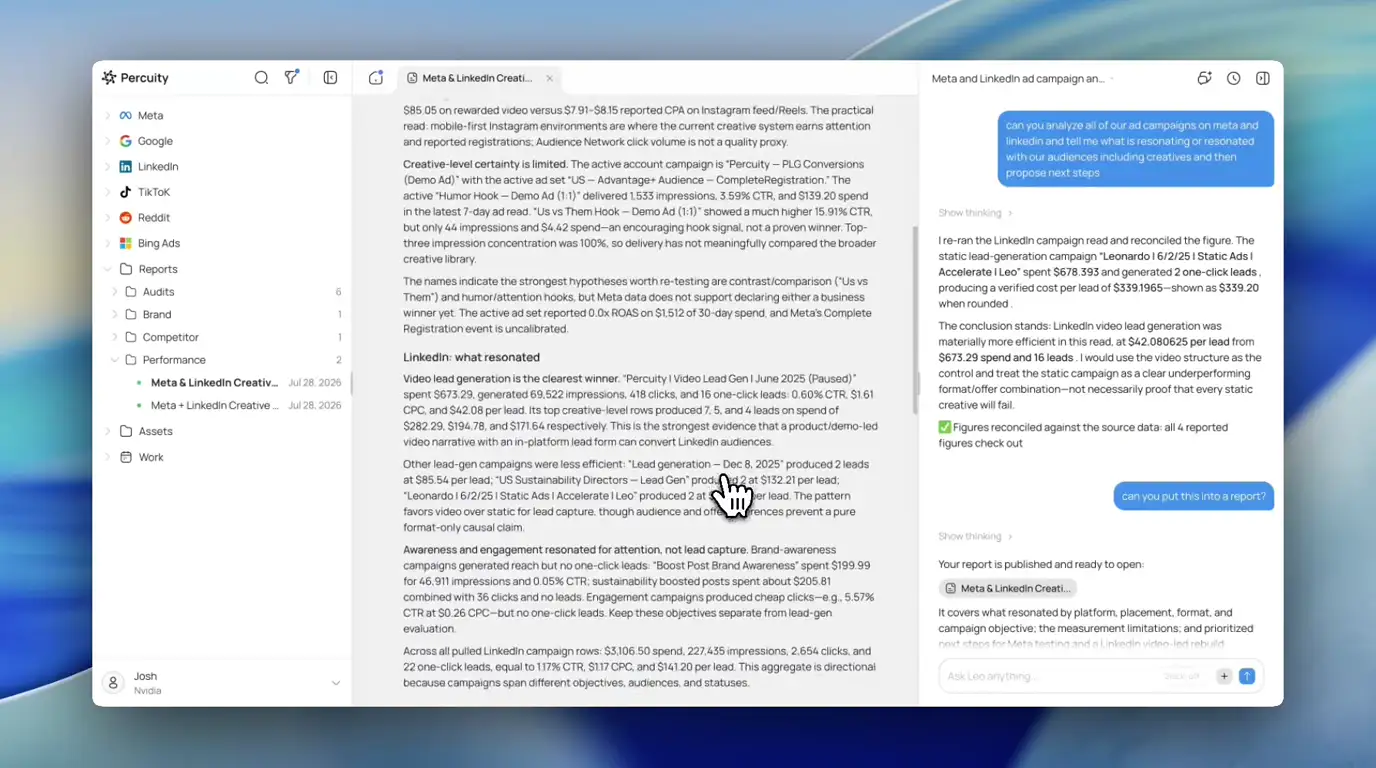
The left sidebar is the whole account surface: Meta, Google, LinkedIn, TikTok, Reddit, and Bing Ads sit alongside Reports, Assets, and Work. Everything Leo reads or writes lives behind those, so you don’t move between six ad managers to see one picture.
0:12 — Ask a reporting question, get an answer
The prompt in the video is the kind of thing you’d normally hand to an analyst:
Can you analyze all of our ad campaigns on Meta and LinkedIn and tell me what is resonating or resonated with our audiences including creatives, and then propose next steps.
Leo comes back with a creative resonance analysis split by platform — what worked on Meta placements, what worked on LinkedIn, where the evidence is thin, and which hypotheses are actually worth re-testing. Note the green check near the end of the response: figures reconciled against the source data. Leo re-reads the platform numbers and confirms them before it reports them, rather than restating whatever it said the first time.
The follow-up is one line — “can you put this into a report?” — and the analysis becomes a saved report under Reports → Performance, ready to open or share.
0:22 — Analyze the competition
Next prompt:
Do a sweep of my competitors and show me what they’re running and what’s working for them. Analyze their ads across platforms, estimate their spend, and call out strategies and opportunities for me.
Leo pulls public ad-library and ads-transparency data, reads the ads it finds, and writes up each competitor with an explicit implication for you. In the run shown, that’s 62 Meta ads across four competitors, plus their landing destinations.
It’s also careful about what it can’t know. Competitor spend isn’t public, so instead of inventing a dollar figure Leo reports visible ad-set footprint and continuity — and says so. At 0:27 it goes a step further and downloads the competitors’ actual ad creative into your Assets library, so the analysis comes with the artifacts.
0:36 — Create on-brand ad variants
With the competitor creative and your own source images on hand:
Can you come up with fresh variants on these displaying new styles that are on brand?
Leo generates a set of variants and opens each one as its own asset tab, then tells you which it thinks is the strongest production candidate and which still need a cleanup pass before they ship. The brand system — palette, framing, type treatment — is carried through from what it learned about your account, not re-specified in the prompt.
0:45 — Build the full campaign
This is the longest chapter, and the one worth watching in full. Leo plans the campaign structure out loud: it checks for naming collisions against existing campaigns, decides geo and age targeting, confirms the creative upload contract, and validates as it goes.
Then it builds — campaign, ad sets, ads, creative uploads — across platforms, and reports back what exists and what state it’s in. In the video the campaign and ad set are created paused with the ads pending Meta’s review, so nothing starts spending on its own. The last beat of the chapter cuts to Meta Ads Manager and the Meta ad preview, showing the same ads Leo just built sitting in the real account.
1:07 — See what Leo is planning next
The final chapter is the part that makes it continuous rather than a one-off. What Leo’s working on splits into three tabs — Needs attention, In progress, Delivered — and fills itself in without being asked. Items in the run include rebuilding Google competitor coverage, reconciling Google Ads conversions before rebuilding, and confirming a LinkedIn account and conversion source.
Open one and you get the reasoning and the report behind it, not just a nudge. The Google Ads audit, for example, found 50 paused Search campaigns, mixed legacy keyword themes, no shared negative lists, and 92 budgets attached largely to paused or removed campaigns — then recommended a clean-room rebuild rather than a relaunch on top of the mess. At 1:14 Leo surfaces the keyword research to support it, and at 1:23 the recommendation becomes a single click to execute.
The loop, in one line
- Frictionless access to every campaign touchpoint
- Quick reporting
- On-brand variant creation
- Competitor analysis
- Full campaign creation across platforms
- Proactive insights
Each one on its own saves an afternoon. Run together, they’re the difference between checking on your ads and actually improving them every week.
Want to try the same loop on your own accounts? Connect a platform and ask Leo your first reporting question.